

Toughbook Alternatives USA 2026: Rugged Laptops Without the Panasonic Price
Panasonic Toughbook is the name everyone in America knows in rugged laptops, and the reputation is earned — they are superb machines, the default choice of US utilities crews, police departments and the military for two decades. They are also priced like it. A new Toughbook FZ-55 from a US authorized reseller typically starts north of $3,000 and climbs well past $4,500 with common configuration options. For the government fleets and utility companies buying them on multi-year contracts, that price is justified. For the US construction firm, surveyor, field engineer or logistics operation that needs two or three rugged laptops rather than two hundred, it usually is not.
This guide covers the honest alternatives for US buyers: what a new mid-market rugged laptop actually gives you, where it genuinely matches Toughbook capability, where it does not, and whether a refurbished Toughbook is the smarter buy for your situation. We stock the laptops below with international shipping to the USA, and we will tell you plainly which one fits which job — including the one we would not recommend for every buyer.
What you are actually paying for with a Toughbook
Being fair to Panasonic matters, because it tells you whether you need one. The Toughbook premium buys three real things: higher extreme-environment specifications on the flagship models (drop ratings up to 6 feet on the FZ-40 class, versus 4 feet on most alternatives), a certified enterprise service network with rapid-replacement contracts across the US, and fleet management infrastructure for IT departments running hundreds of devices. If your organization needs any of those three at scale — or FirstNet-certified public safety configurations — buy the Toughbook.
What the premium does not buy is exclusivity on the fundamentals. IP65 sealing, MIL-STD-810G drop and vibration certification, sunlight-readable displays, hot-swappable batteries and industrial ports are all available on rugged laptops at a fraction of the price — because the underlying engineering is no longer rare. That is the gap this guide lives in.
The best Toughbook alternative for most US buyers
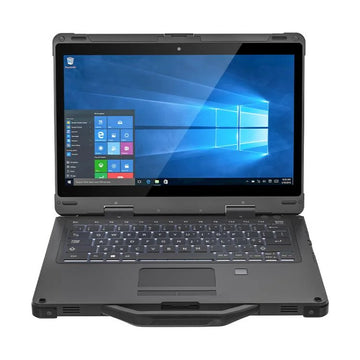
UNIWA ULAP R133 — modern platform, industrial build
The R133 is the alternative we recommend first, and the reason is the platform: an 11th-generation Intel Core i5-1135G7 with Iris Xe graphics, Windows 11, WiFi 6 and a Thunderbolt 4 USB-C port. That specification matters more than it looks — a large share of the rugged laptop market, including many refurbished Toughbooks and some new alternatives, is still shipping on Windows 10, which Microsoft stopped supporting in October 2025. A rugged laptop is a 3–5 year purchase; buying one on an unsupported operating system in 2026 is a false economy regardless of the chassis around it.
The rugged credentials are genuine: IP65 sealing against dust and water jets, MIL-STD-810G certification with a 4-foot drop rating, and an operating range of -4°F to 140°F — covering everything from a Minnesota winter site to a Texas summer truck cab. The 13.3-inch display runs at 400 nits, bright enough for outdoor readability, and the 78-key keyboard is backlit for early starts. The removable 5,600mAh battery supports hot swapping, so a spare battery means genuinely uninterrupted field use. At 4.8 lbs it is also lighter than most of the Toughbook range.
Ports cover both modern and industrial needs: three USB 3.0, Thunderbolt 4, HDMI, gigabit RJ45 and a native RS232 serial port — the interface that surveying instruments, diagnostic equipment and legacy industrial gear still depend on, and the reason a standard consumer laptop plus a case never fully replaces a rugged machine.
The field-connectivity option — with an honest caveat
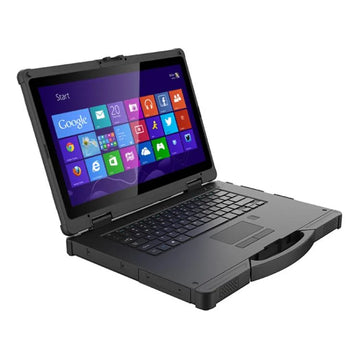
UNIWA ULAP R14 — built-in 4G, GPS and industrial interfaces
The R14 exists for a specific buyer: the field operation that needs connectivity and industrial interfaces built into the machine itself. It carries a 4G LTE modem with a SIM slot, a GPS module, dual RJ45 LAN ports and both RS232 and RS485 serial interfaces — a combination the R133 does not offer and that matters for vehicle-mounted use, remote telemetry, site diagnostics and equipment that speaks RS485. It adds a dual-battery system (internal plus removable) for extended off-grid running and a larger 14-inch full HD display. For US buyers considering the cellular option, verify LTE band compatibility with your carrier before purchasing — band support is listed on the product page.
The honest caveat: the R14 runs Windows 10 Home on an 8th-generation Intel Core i5. Windows 10 is past its end-of-support date, and while the machine will run today's field software without issue, it is the older platform of the two. Our plain recommendation: buy the R14 only if the built-in 4G, GPS or RS485 connectivity is a requirement for your operation — those features are genuinely hard to find elsewhere at this level. If you do not need them, the R133 is the better long-term machine.
New alternative vs refurbished Toughbook — the honest comparison
The refurbished Toughbook market in the US is huge and worth taking seriously. A refurbished FZ-55 or CF-33 from a US refurbisher can cost less than a new alternative, and the chassis engineering is excellent. Here is the fair comparison:
A refurbished Toughbook wins on chassis pedigree and, on flagship models, higher drop ratings. If your environment genuinely involves 6-foot drops onto concrete daily, the used Panasonic is the stronger tool.
A new alternative wins on the things that age: you get a new battery at full capacity rather than a used cell of unknown cycle count, a current-generation processor rather than a chip from several generations back, Windows 11 rather than the Windows 10 installs common on refurbished stock, WiFi 6 and Thunderbolt 4 rather than the standards of five years ago, and a full warranty rather than a refurbisher's 90-day to 1-year cover. For a machine you intend to run hard for years, the battery and OS points alone decide it for most buyers.
Toughbook alternative comparison — USA 2026
| Requirement | Recommendation | Why | |
|---|---|---|---|
| Most US buyers — modern platform | UNIWA ULAP R133 | Windows 11, 11th-gen i5, WiFi 6, Thunderbolt 4, hot-swap battery | See details ↓ |
| Built-in 4G / GPS / RS485 | UNIWA ULAP R14 | Field connectivity and industrial interfaces built in | See details ↓ |
| 6ft drop spec, FirstNet, fleet contracts | New Panasonic Toughbook | The premium is justified at that requirement level | |
| Touchscreen, tablet form factor | Rugged Windows tablet | Lighter option for inspection and survey work | Browse → |
What about a rugged tablet instead?
For inspection, surveying and delivery workflows built around forms and photos rather than heavy desktop software, a rugged Windows tablet is often the better-shaped tool — lighter, touch-first and cheaper. See our rugged Windows tablet guides or browse the rugged tablet range.
Frequently asked questions — Toughbook alternatives USA
Is there a cheaper alternative to the Panasonic Toughbook in the USA?
Yes. New rugged laptops with IP65 waterproofing, MIL-STD-810G certification and current Windows 11 platforms are available at a fraction of new Toughbook pricing, with international shipping to the USA. The UNIWA ULAP R133 is our recommended starting point.
Are Toughbook alternatives actually rugged?
Check the certifications rather than the marketing. IP65 or better sealing and MIL-STD-810G/H certification are independently tested standards. Both laptops in this guide carry IP65 and MIL-STD-810G; the R133 is drop-rated to 4 feet and operates from -4°F to 140°F.
Should I buy a refurbished Toughbook or a new alternative?
Buy refurbished if you specifically need the flagship Toughbook drop ratings or FirstNet configurations. Buy new if battery life, a supported operating system, current connectivity and warranty matter — which for most 3–5 year business purchases they do.
Do these rugged laptops work with surveying and industrial equipment?
Yes — both include a native RS232 serial port, and the R14 adds RS485 and dual LAN, covering the legacy interfaces that surveying instruments and industrial diagnostic equipment still use.
What is the best rugged laptop alternative to a Toughbook in 2026?
For most US business buyers, the UNIWA ULAP R133 — the combination of a current Windows 11 platform with genuine IP65/MIL-STD credentials and a hot-swappable battery is the strongest all-round package at its price level.
Summary
A Panasonic Toughbook is the right buy for US enterprise fleets with extreme-environment specs, FirstNet requirements and service contracts to match. For most US businesses buying one to five rugged laptops, a new alternative on a current platform is the smarter purchase — and the UNIWA ULAP R133, with Windows 11, an 11th-gen Intel Core i5, IP65 sealing and MIL-STD-810G certification, is where we would start. If your fieldwork needs built-in 4G, GPS or RS485, the UNIWA ULAP R14 covers requirements almost nothing else at this level does — with the Windows 10 caveat stated plainly above.
Browse the full rugged laptop range with international shipping to the USA. Equipping a team? Request a volume quote for five or more units. Related guides: Toughbook alternatives UK 2026, best rugged phone USA 2026 and best rugged phone for AT&T USA 2026.